onlineberatung.digital · Beratungsraum

The Beratungsraum

A room for your online counselling.

Messages, video, whiteboard and case notes in one protected place.

For systemic counselling, for counselling centres and for coaches with their own practice. You set up figures, lay out cards and take notes, just as in the counselling room. Clients come in with a pseudonym and a password.
  • Servers in Germany
  • Pseudonym instead of real name
  • €15 per counsellor per month

Who the Beratungsraum is made for

Systemic counselling

Systemic board, position cards and Inner team are right there in the room. You work on them together and see every change straight away.

Counselling centres

Centre lead, team and office with clear permissions. In-person and online cases run in one system, plus statistics for your reports.

Coaches with their own practice

You sign up your own practice and are centre lead and counsellor in one. Your free times also appear on your own website.

Counselling in the room

Everything in one place

Each counselling relationship has its own room. That is where messages, appointments, whiteboards and your case notes are kept.

Rooms and messages

Clients write whenever it suits them, from their phone too. You reply in the room, and you both see what has been read.

  • Messages are stored encrypted on the server.
  • In couples counselling, the second person gets their own access.
  • A second counsellor can join in. Their name then appears in the room.
  • Clients download their messages themselves.
The room as the client sees it, with made-up test data: messages with the counsellor Mona Bauer and the next appointments.

Video in the room with whiteboard

At the appointment the whiteboard opens, and the video runs next to it in a small window. Clients knock and appear with their pseudonym.

  • Every appointment has its own locked video room.
  • On a computer you choose your camera, microphone and speakers yourself.
  • Clients follow your view of the board. With “Back to centre” they can return at any time.
  • The platform does not record picture or sound.
An appointment in the app on an iPad: the whiteboard with notes on the conversation with the boss, a blue and a green box, arrows, a red circle around the most important note and two figures from “Inner team”, bottom right the counsellor Jonas Berger on video, made-up test data.

Methods

Methods from the counselling room, now online too

Counsellor and client work on the whiteboard at the same time and see every change straight away. You prepare the board before the appointment.

Systemic board

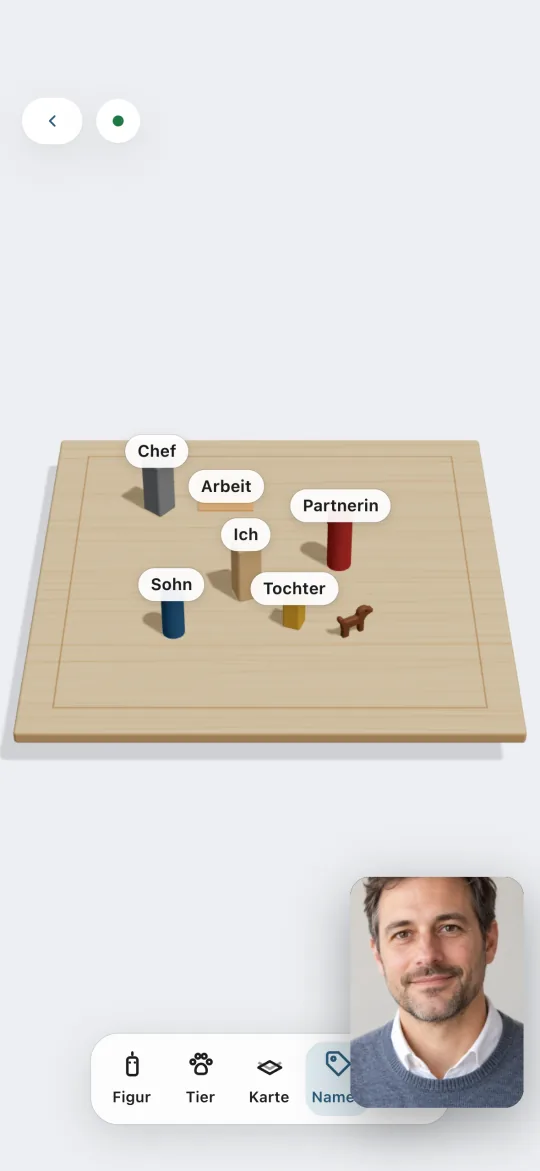
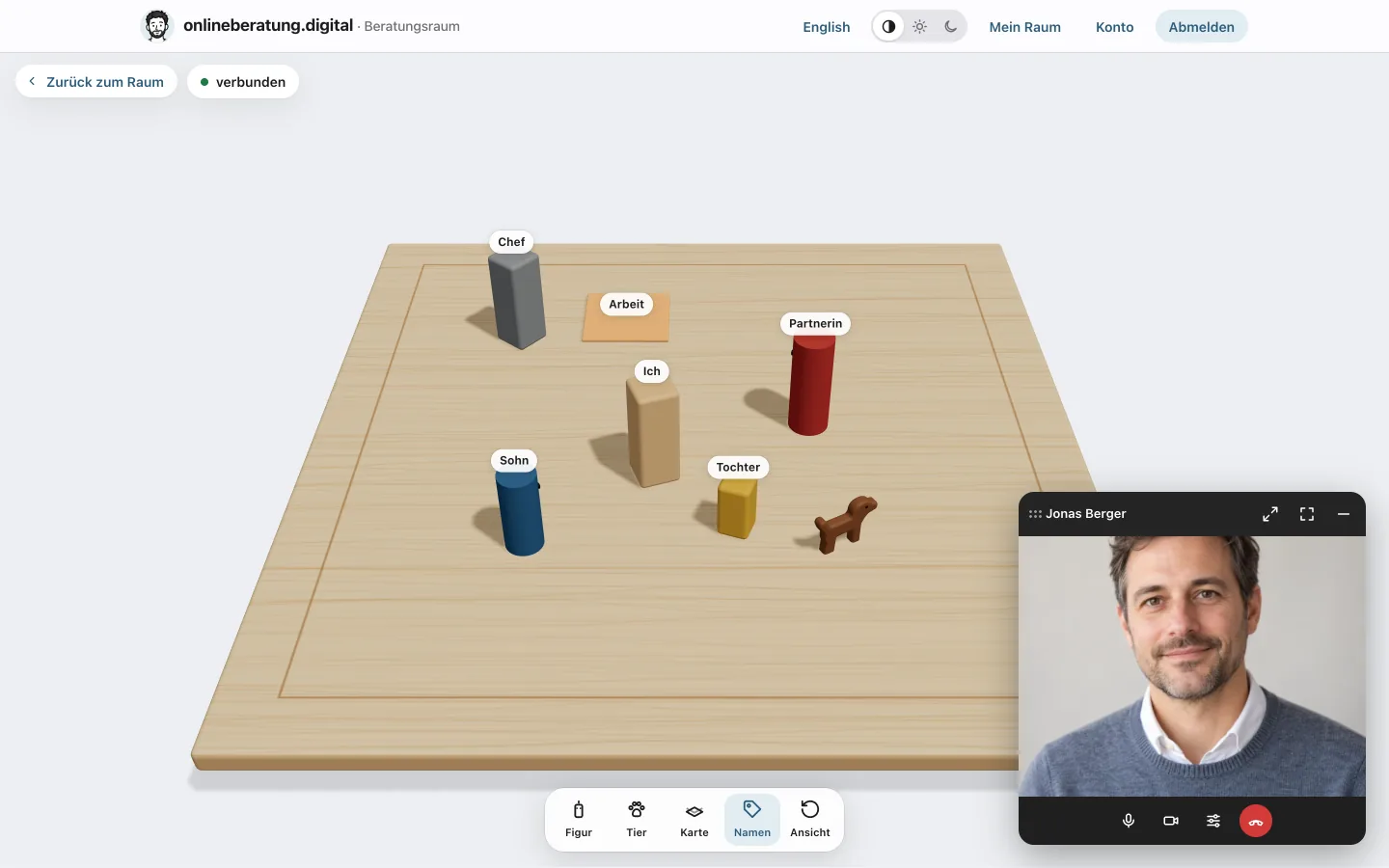
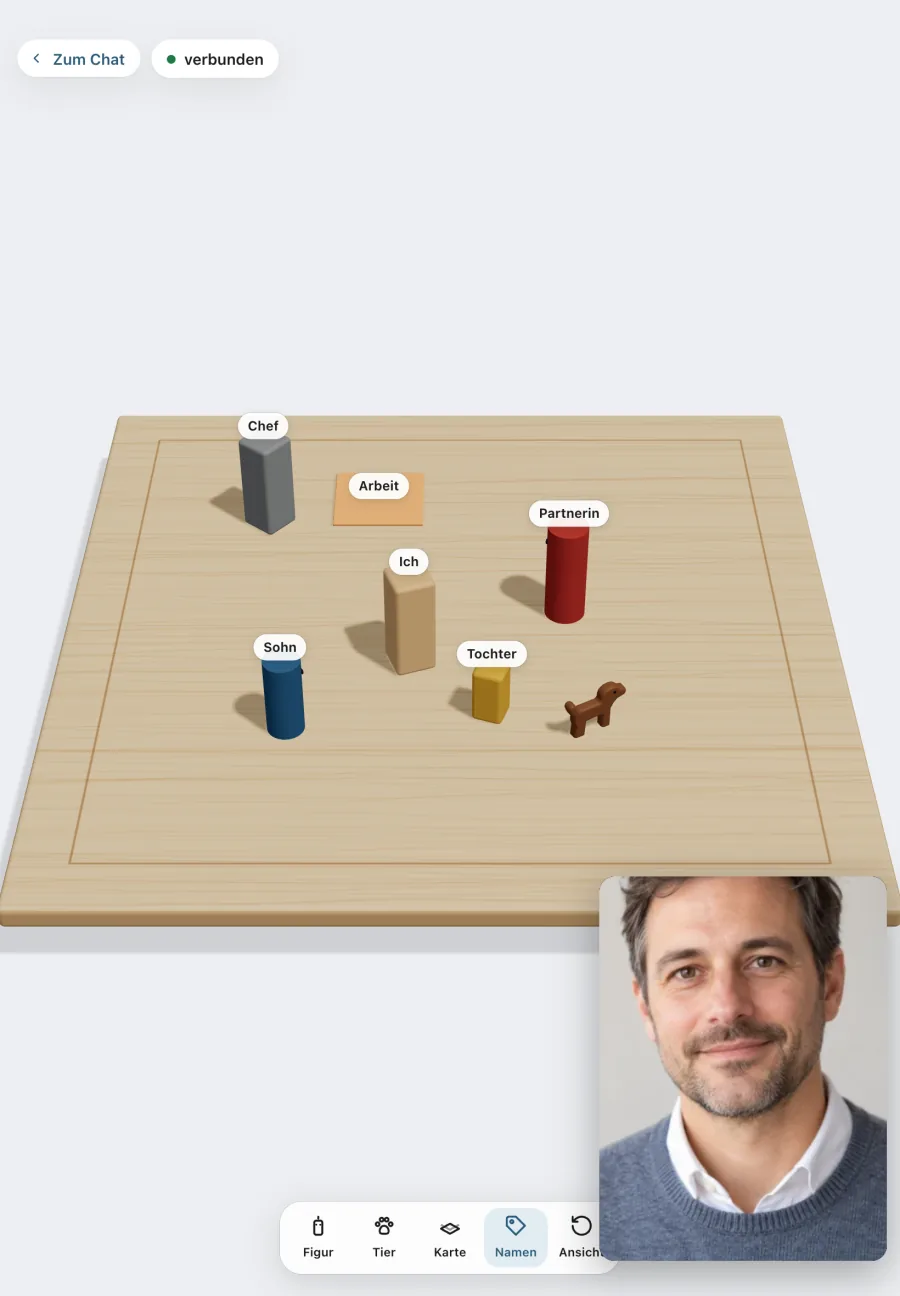
You place figures, animals and cards on a wooden board in 3D. Closeness, distance and the direction people face become visible.

  • Figures in several colours and 18 animals
  • Five boards: classic, plain, as a circle, as a cross or with a crack
  • With “My view” the client sees the board from your angle.
Systemic board in 3D: a wooden board with the figures Me, Partner and Daughter, a dog and a card Work.

Position cards

A map lies on the table and you place figures on it: Where are you today, where do you want to go?

  • Resource map
  • Weather map
  • Map of the male soul
The weather map as a position card on the table, with a figure Today in the thunderstorm and a figure Goal by the sun.

Inner team

A card set with nine drawn figures, from the Driver to the Cautious one. If you share the set, the client places their inner voices on the board themselves.

  • Next to each figure goes a note with what that voice says.
  • The card set is available in German and English.
Whiteboard with five drawn figures from the “Inner team” card set around a note “Me”, next to them notes with what they say, made-up test data.

Also on the whiteboard

  • Notes, a pen and a scale from 0 to 10
  • The ego states from transactional analysis as a template
  • Prompt cards: 50 value cards with photos
  • After the appointment the board is available as an image or PDF. Next time you continue on a copy.

Case notes and administration

Order behind the scenes

Case notes, in-person cases and running your centre all happen in the same system. Each role only sees what it needs.

Case notes from key points

You write key points, and the platform sorts them into the sections of your template. Words like “Strengths:” or “Next step:” start a new section. You check and change the draft, then you save it.

  • Date, duration and type: in person, video, phone or messages
  • If you like, your own template with sections for your centre
  • Every change becomes a new version, and the older ones stay readable.
  • Stored encrypted. Only you and a co-counsellor can read them.

An AI draft is coming soon. Each centre decides for itself whether to use it.

History and case notes of a case with made-up test data: an open entry with the sections Concern, Strengths, Agreement and Next step.

In-person cases and office

You create sessions at the centre or by phone as a case, with the people involved, appointments and case notes. The people involved need no account. If someone wants to continue online, they get an invitation code, and it stays the same case.

  • The office creates cases, keeps names and contact details up to date and books appointments for the counsellors.
  • The office never sees case notes, messages or whiteboards.
  • The office needs no licence.
  • Details about the people involved are stored encrypted.
An in-person case as the office sees it, with made-up test data: appointments at the centre and by phone, on the right the responsible counsellor.

Team, centre lead and statistics

The centre lead invites the team, approves counsellors, books licences and hands over cases when someone leaves. They never see messages or case notes.

  • Statistics for your centre: cases, contacts, hours, counselling areas, age, gender and place of residence
  • Always without names. Small places of residence are grouped under “other places”.
  • You can download a year’s figures as CSV, for funding reports for example.
Statistics of a centre with made-up test data: cases, contacts and hours of one year, below them the counselling areas.

Appointments and connections

Fits with what you already use

People seeking support only book times that are really free. You connect calendars and Zoom if you want to.

Appointments on your website

Your free times for a first session appear on your own website, always up to date. A click on a time leads to the booking on the platform.

  • WordPress plugin, already set up for your counsellor profile, with a block and a shortcode
  • For Jimdo, Wix, Squarespace or your own site, a short piece of HTML to copy
  • No cookie. Your website receives no data about the people seeking support.
  • You can match the colour of the buttons to your site.
The box with free appointments on a website: first session with Mira Hansen, times on four days, made-up test data.

Calendars from Microsoft and Google

Every counsellor can connect their calendar. Booked appointments then appear there straight away, only as “Counselling” with the link to the room. The platform does not offer times that are busy there. For that it only reads the start and end.

  • Outlook, Microsoft 365 and Google Calendar
  • Before every booking the platform checks the calendar once more.
  • Cancelled appointments disappear from the calendar again.
  • Without a connection there is a private subscription link for Apple and other calendars.

Microsoft and Google are providers from the USA. Connecting is optional, and each counsellor decides for themselves.

The “Times and video link” page with made-up test data: a connected Microsoft calendar, Google Calendar and the subscription link.

Zoom for the whole centre

If your centre works with Zoom, the centre lead connects the Zoom account once. After that, the platform creates a separate meeting with a waiting room and passcode for every video appointment. It updates the meeting when the appointment moves and deletes it when the appointment is cancelled.

  • Zoom only receives the start, the duration and the topic “Appointment”.
  • The centre lead links each counsellor to their Zoom user.
  • Each counsellor chooses whether to use Zoom or video in the room.

Zoom is a provider from the USA. Connecting is optional, and video in the room works without Zoom.

Zoom on the centre page with made-up test data: connected, below it the links between counsellors and their Zoom users.

The Beratungsraum app

The app for clients

With the app for iPhone and iPad, clients always have their room with them: messages, appointments, video and whiteboard.

  • Notifications without content. They only say that something new has arrived.
  • Protected with Face ID. When switching to another app, the screen stays covered.
  • Appointments go into their own calendar with one tap, and cancelling works too.
  • On Android and on a computer everything runs in the browser, with nothing to install.

The app is currently being tested through TestFlight. It will come to the App Store as soon as Apple approves it.

The Beratungsraum app on an iPhone: chat with the counsellor Thomas Weber and a second counsellor, made-up test data.
The app on an iPhone: upcoming appointments above the chat with the buttons Join appointment, Add to my calendar and Cancel appointment.

Privacy

Built for confidential conversations

You stay responsible for your counselling. The platform works on your behalf, with a data processing agreement under Art. 28 GDPR.

  • A pseudonym and a password are enoughPeople seeking support need no real name and no phone number. An email address for reminders is optional.
  • Two-factor sign-in for all professionalsCounsellors, centre leads and office staff sign in with a password and a code from an app. Passkeys are coming soon.
  • Servers in GermanyThe platform runs on a server in Germany, and the connection is encrypted. Emails go through servers in Frankfurt.
  • Keeping and deletingThe platform deletes closed cases after your chosen period, after 6, 12, 24 or 36 months, with messages, case notes and appointments. People seeking support can delete their account themselves.
  • Video through WherebyVideo in the room runs through Whereby, a provider from Norway. Every appointment has its own locked room. Nothing is recorded.
  • No ads, no tracking in the roomNothing is counted in the room, in your workspace or in the app. Statistics with Matomo only run on public pages and only with consent.

Try it

Try it free for 7 days

Sign up your centre or your own practice and try everything out. The trial costs nothing and ends by itself.

Would you prefer a demo first? Write to me at hallo@heinerfischer.de. Prices and frequently asked questions are on the page For counselling centres.

Your centre
What are you registering?

Counselling fields at least one, can be changed later

You as centre lead

Check with ALTCHA, without cookies and without third-party servers.